
Before Chow Co team managers can set the schedule and give you, we need to know your availability.
You can set your availability through our Workplanner app SameSystem Check-in.
You can only mark yourself as “Not available” if you do not have a shift scheduled for the given day.
Holiday
Please be aware that you can max. mark 6 days as unavailable in a row for the schedule planning. If you wish to take 7 days or more off in a row, it is considered vacation and will have to be submitted to and approved by your manager.
How to
Open the app and navigate to the Calendar tab in menu in the bottom.
When on the Calendar tab, you will find an icon with + in the bottom right-hand corner.
Press this button followed by ‘Mark availability’
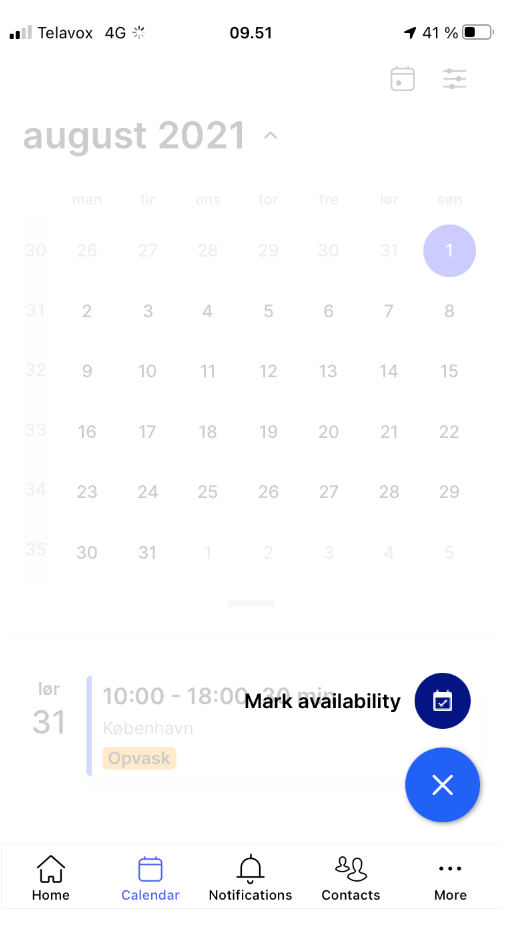
Pick the option to ‘Mark unavailability’ and pick the days where you cannot work.
In the case that you are unavailable for just part of the day, you also have the option of using the sliders to select a time interval of the day that you are unavailable.
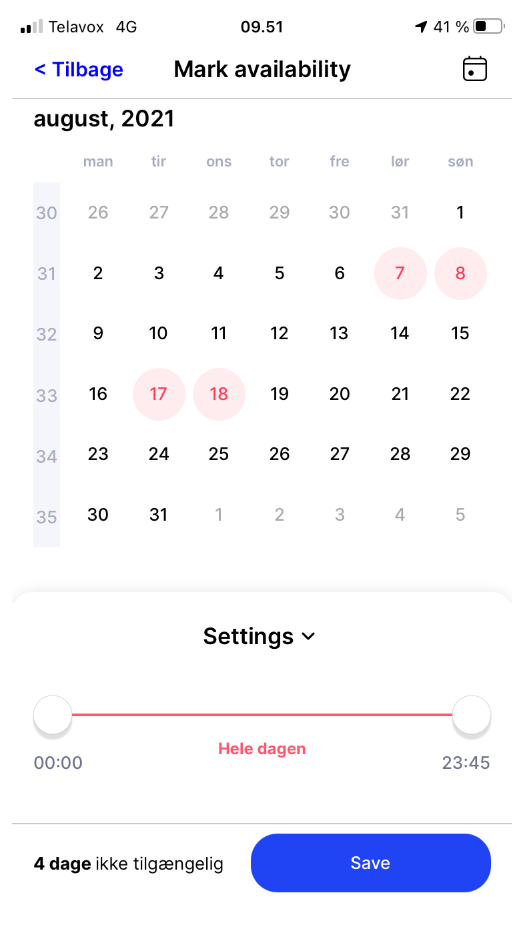
At the end, press save to finish marking your unavailability.